Best Video Editing Software for Real Estate
The best video editing software for real estate depends on how much you edit. DaVinci Resolve is the strongest free option and has the best colour grading of any editor at any price. Adobe Premiere Pro is the industry standard and the easiest to hire for. Final Cut Pro is fastest on Apple silicon and a one-off purchase. CapCut is the quickest route to vertical social cuts. If you edit more than four listings a month, the software is not your bottleneck — your time is.
This is a buyer’s framework built from published specifications, pricing and the features that actually matter for property work. It is not a hands-on lab test, and where that distinction matters we say so.
How the choice plays out at different volumes
At one to two listings a month, the software genuinely doesn’t matter much — CapCut or Premiere Rush will get you through it in an afternoon. Above roughly three listings a month, the time saved by DaVinci Resolve’s proper scopes and colour tools starts to outweigh its steeper learning curve. Past eight listings a month, the constraint stops being software entirely and becomes hours in the day — see the outsourcing math in the article above.
A note on switching software mid-workflow
Editors sometimes assume switching to a “better” editor will fix a quality problem that’s actually a workflow problem — inconsistent colour matching, no shot list, rushed cuts. Resolve won’t fix footage that was never properly white-balanced on set, and Premiere won’t fix a shoot that skipped the establishing exterior shot. Diagnose whether the bottleneck is really the software before switching tools.
Written by the editing team at Real Estate Video Editor. We edit property video every day for agents, photographers and brokerages. Figures on this page carry a source and a date. If something here is out of date or wrong, email [email protected] and we will correct it.
Comparison at a glance
| Software | Price | Best for | Colour grading | Vertical reframing | Learning curve |
|---|---|---|---|---|---|
| DaVinci Resolve | Free / $295 one-off | Colour-critical work | Best in class | Good | Steep |
| Adobe Premiere Pro | ~$23/mo | Professional standard | Very good | Very good | Moderate |
| Final Cut Pro | $299 one-off | Mac users, speed | Good | Good | Moderate |
| CapCut | Free / ~$8/mo | Fast social cuts | Basic | Excellent | Very easy |
| Adobe Premiere Rush | ~$10/mo | Simple listing edits | Basic | Good | Very easy |
| iMovie | Free | First-ever edit | Minimal | Limited | Very easy |
*Pricing checked August 2026. Always confirm current pricing with the vendor before buying.*
What actually matters for real estate editing
Most software comparisons rank features nobody uses. For property video, five things decide whether a tool is workable.
- Colour correction per shot, not per project. Property interiors mix daylight, tungsten and LED. You need to correct white balance room by room, which means secondary colour tools, not a preset filter.
- Camera matching. If you shoot drone and interior on different bodies, you need scopes — a waveform and a vectorscope — to match them. Software without scopes forces you to match by eye, and you will get it wrong.
- Log and LUT support. Modern cameras and drones shoot log profiles. You need to apply a manufacturer LUT before grading. Consumer editors often cannot.
- Genuine vertical reframing. Not a centre crop. You need to reposition the crop per shot and keyframe a pan inside it.
- Batch export presets. You are delivering the same edit in 16:9, 9:16, branded and unbranded. Doing that manually four times per listing is where the hours go.
DaVinci Resolve
Strengths
- Free version is genuinely professional, not crippled
- Best colour grading tools available at any price
- Excellent scopes for matching drone to interior
- Fairlight audio built in
- Strong on modern hardware
Weaknesses
- Steepest learning curve of the group
- Heavy on system resources
- Page-based interface is unintuitive at first
- Smaller pool of freelancers who know it
Verdict: if you are going to learn one editor properly and colour matters to you, learn Resolve. The free version will do everything a property editor needs for years.
Adobe Premiere Pro
Strengths
- Industry standard — easiest to hire for
- Excellent Lumetri colour tools
- Deep integration with After Effects for graphics
- Huge library of tutorials
- Strong multi-format export
Weaknesses
- Subscription only, no perpetual licence
- Can be unstable on long timelines
- Colour tools are good but not Resolve-good
Adobe publish their own colour workflow documentation, which is the reference for the log-to-Rec.709 process every property editor uses on drone footage.
Final Cut Pro
Very fast on Apple silicon and a single purchase rather than a subscription, which pays for itself in about thirteen months against Premiere. The magnetic timeline is either the thing you love about it or the thing that makes you quit. Colour tools are competent but a step behind both Resolve and Premiere.
Verdict: strong choice if you are on a Mac, edit regularly, and dislike subscriptions.
CapCut
Not a professional editor, and not trying to be. What it is very good at is turning a horizontal edit into a vertical social cut quickly, with captions, in a workflow designed around phone-first output. A lot of working agents use Resolve or Premiere for the listing video and CapCut for the Reels.
Verdict: a useful second tool, not a first one.
Which one should you actually pick?
| Your situation | Recommendation |
|---|---|
| You edit 1–2 listings a month | CapCut or Premiere Rush. Do not over-invest. |
| You edit 3–6 listings a month | DaVinci Resolve free. Learn it properly. |
| You are a photographer adding video | Resolve or Premiere, plus CapCut for social |
| You are on a Mac and hate subscriptions | Final Cut Pro |
| You want to hire an editor later | Premiere Pro — biggest talent pool |
| You edit more than 8 listings a month | None of them. Outsource — see below. |
The honest conclusion
Past roughly eight listings a month, the software stops being the constraint. At two to four hours of editing per listing, eight listings is a full working week of post-production. No editor, however good, makes that time back.
At that point the question changes from *which software* to *should I be doing this at all*. Our editing service starts at $99 per listing video and volume pricing drops to $75 — which for most photographers is less than an hour of their own billable time.
Frequently asked questions
What is the best free video editing software for real estate?
DaVinci Resolve. The free version includes the full colour grading suite, scopes for matching drone to interior footage, and professional audio tools. Nothing else free comes close for property work.
Do I need Adobe Premiere Pro for real estate video?
No. Premiere is the industry standard and the easiest to hire freelancers for, but DaVinci Resolve is free and has better colour tools. Choose Premiere if you plan to hire editors; choose Resolve if you plan to edit yourself.
What software do professional real estate video editors use?
Predominantly Adobe Premiere Pro and DaVinci Resolve, with Final Cut Pro common among Mac-based editors and After Effects used for custom title and graphics packages.
Can I edit real estate video on my phone?
For vertical social cuts, yes — CapCut on a phone is genuinely capable. For a full listing video with colour grading and drone integration, no.
Is it worth buying editing software if I only do a few listings?
Usually not. Below about three listings a month the free tiers are enough, and above about eight the maths favours outsourcing over any software purchase.
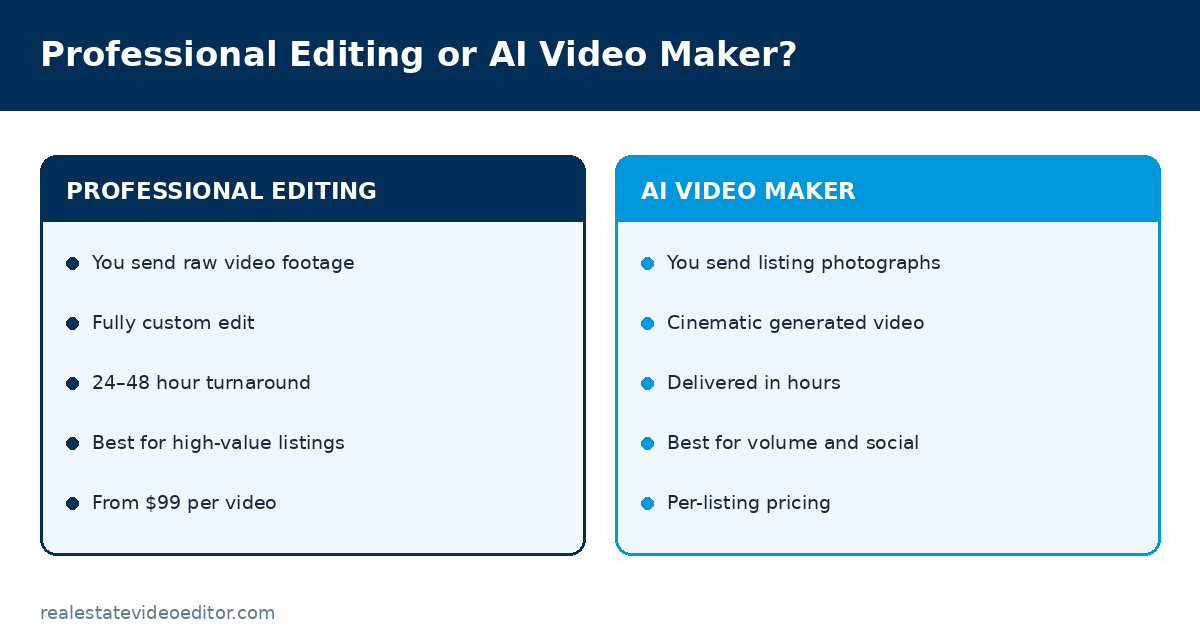
Rather not edit at all? We edit real estate video for agents, photographers and brokerages from $99 with 24–48 hour turnaround. See the service or get a quote.
Sources and further reading
We link out to primary sources rather than to other blogs. Where a figure on this page comes from research we did not conduct, the original study is linked below.
- Adobe — Working with log footage and LUTs in Premiere Pro — Technical reference for the log-to-Rec.709 workflow described on this page.
- US Bureau of Labor Statistics — Film and Video Editors — Official occupational data on video editor pay and employment outlook.
- Google Search Central — Creating helpful, reliable, people-first content — Google’s guidance on content quality, which shapes how we write every page on this site.
- Instagram Help Centre — Reels specifications — Official Instagram documentation on Reels length, aspect ratio and upload requirements.
Related guides
Real Estate Video Editing: The Complete Guide
Process, cost, outsourcing and quality markers.
Written by the editing team at Real Estate Video Editor. We edit property video every day for agents, photographers and brokerages. Figures on this page carry a source and a date. If something here is out of date or wrong, email [email protected] and we will correct it.

Specialist real estate video editors. We turn property footage and listing photographs into finished listing videos for agents, photographers and brokerages worldwide.
[email protected]
Replies within 4 business hours
Editing Services
AI Video Maker
Guides & Resources
Serving real estate agents, property photographers and brokerages in the United States, Canada, the United Kingdom, Australia and worldwide. All editing performed by a dedicated real estate video team. We do not shoot on location — everything is remote and digital.
- © 2026 Real Estate Video Editor
- Privacy Policy
- Terms of Service
- Acceptable Use
- Refund Policy
- AI Transparency