AI Real Estate Video Makers Guide
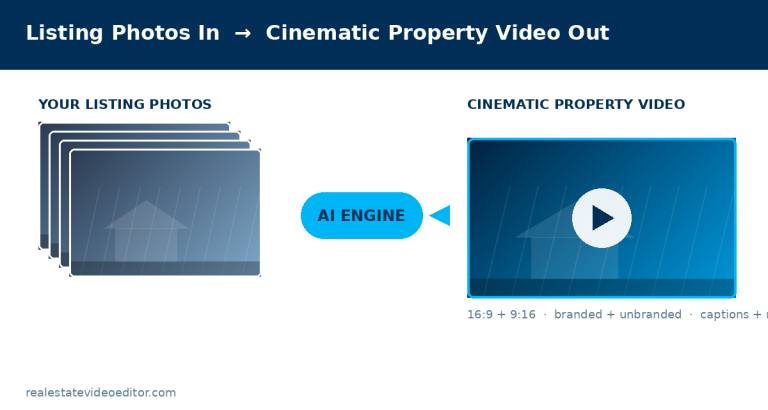
An AI real estate video maker converts listing photographs into a property video. It estimates depth in each image, separates the scene into layers, generates a camera path, and renders movement with parallax so it reads as real camera motion. The images are then sequenced into walkthrough order and finished with transitions, captions, music and agent branding. You need 8 to 30 photographs, no video footage, and no editing software.
A realistic photo-set checklist for good AI output
- 8–20 photos, one clear subject each (avoid photos that already blend two rooms in one frame)
- Consistent, even lighting across the set — mixed flash and natural-light photos produce visibly inconsistent output
- At least one true exterior establishing shot
- Horizontal orientation at a reasonably high resolution — small or heavily compressed images produce visible artifacting once animated
How output quality scales with input quality
AI photo-to-video tools amplify what’s already in the source photo rather than correcting it — a poorly lit or badly composed listing photo becomes a poorly lit, badly composed few seconds of video, just animated. The single biggest lever over output quality isn’t the tool choice, it’s whether the underlying listing photos were shot properly in the first place.
Written by the editing team at Real Estate Video Editor. We edit property video every day for agents, photographers and brokerages. Figures on this page carry a source and a date. If something here is out of date or wrong, email [email protected] and we will correct it.
How the technology actually works
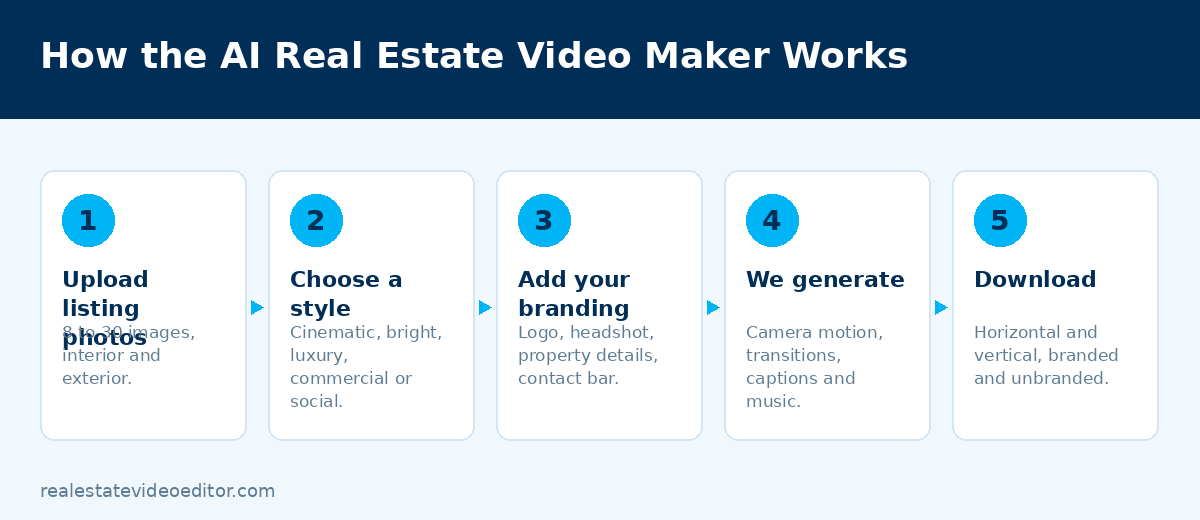
- Depth estimation. A model analyses each photograph and produces a per-pixel estimate of distance from the camera — a depth map.
- Layer separation. The image is split into depth planes: foreground objects, mid-ground, background, and through-window content.
- Motion path generation. A camera path is chosen to suit the space — a slow push-in for a living room, a lateral drift for a long kitchen, a rise for a tall entrance.
- Parallax rendering. As the virtual camera moves, near layers shift more than far layers. That parallax is what makes it read as camera movement rather than a zoom.
- Gap filling. Movement reveals areas hidden behind foreground objects, and the model fills them. This is where artefacts appear if motion is too aggressive.
- Sequencing and finishing. Clips are ordered, transitions applied, captions and property detail cards added, music laid under, and branding applied.
How many photographs and how long a video
| Property type | Photographs | Video length |
|---|---|---|
| Studio or one-bed apartment | 8–12 | 25–40 seconds |
| Two to three bed home | 12–18 | 40–60 seconds |
| Four+ bed family home | 18–25 | 60–85 seconds |
| Luxury or estate | 25–30 | 85–120 seconds |
| Commercial property | 15–25 | 55–90 seconds |
Each photograph becomes roughly 2.5 to 3.5 seconds of finished video, depending on the pacing of the template.
Photo order is the biggest single factor
Most people upload photographs in the order they came off the camera, and the video jumps between floors and rooms as a result. Order them the way a buyer would physically walk the property: exterior approach, entry, main living space, kitchen, dining, primary bedroom, remaining bedrooms, bathrooms, outdoor space, aerial.
Reordering takes two minutes and makes more difference than any other setting. Our photo-to-video guide covers this in full, including a twelve-point preparation checklist.
What it costs
| Provider | Pricing | Model |
|---|---|---|
| Real Estate Video Editor | $49 single listing, $129–$299/mo | Per listing, 4 files each |
| Reel-E | $44–$449/mo | Per listing |
| AutoReel | From ~$49/mo | Subscription |
| Amplifiles | $1.50/image or $29/mo | Per image |
See the full comparison of AI real estate video generators for what to check before buying.
MLS compliance and disclosure
Two rules apply. First, most MLSs prohibit agent or brokerage branding on syndicated media — standards are maintained through RESO but the specific rule is set locally, so you need an unbranded cut. Second, a property video must not misrepresent the property.
Generated camera movement does not misrepresent anything — it moves a virtual camera through your own photograph. Virtual staging is different: adding furniture to an empty room changes what the buyer sees, and in most markets that carries a disclosure obligation under advertising and fair housing rules. Any tool you use should make staging opt-in and disclose it on export.
When a human editor is still better
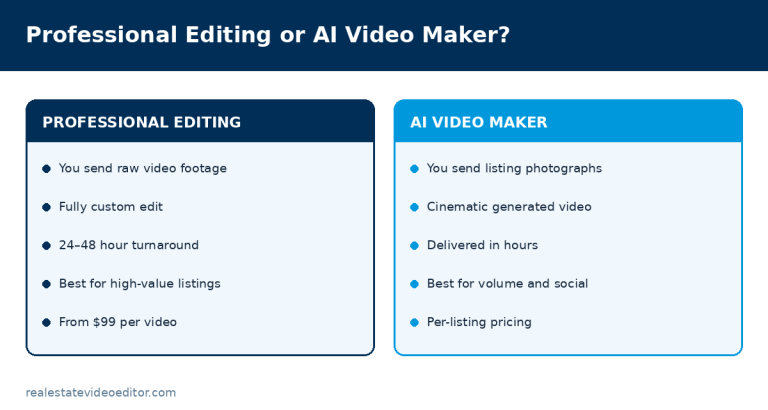
We sell both, so we have no reason to oversell either.
Use AI when
- You have photographs but no footage
- You need volume and speed
- You are marketing many similar units
- Budget per listing is tight
- The alternative is no video at all
Use a human editor when
- The video is the primary marketing
- You filmed the property
- There is drone footage to integrate
- The seller will judge you on quality
- It is going in a listing presentation
Frequently asked questions
What is an AI real estate video maker?
A tool that converts listing photographs into a property video by estimating depth in each image, generating camera movement with parallax, and sequencing the results with transitions, captions, music and branding. It requires photographs only — no video footage and no editing software.
How many photos do I need for an AI property video?
Between 8 and 30. Below 8 the video is too short to be useful; above 30 the pacing suffers unless the property is large. For a standard family home, 15 to 20 well-chosen photographs give the best result.
Does AI property video work for rentals and multifamily?
Very well — it is arguably the strongest use case. Build one template per unit type and produce every unit from the same setup. See our property managers page.
Can the AI show a room I did not photograph?
No. The video can only contain what is in your photographs. There is no way around this in any product on the market.
Is AI video good enough for a luxury listing?
Usually not as the primary asset. For a high-value listing where the video is the marketing, a human edit of filmed footage will beat generated video from stills. Use AI for the social cuts alongside it.
Try it on your next listing. Send 8 to 30 photographs and we return a finished property video from $49. Create your video.
Sources and further reading
We link out to primary sources rather than to other blogs. Where a figure on this page comes from research we did not conduct, the original study is linked below.
- Google Search Central — Creating helpful, reliable, people-first content — Google’s guidance on content quality, which shapes how we write every page on this site.
- RESO — Real Estate Standards Organization — The body that maintains MLS data standards, including media and syndication rules.
- HUD — Fair Housing Act advertising guidance — US fair housing rules that govern how a property may be advertised, including in video.
- Instagram Help Centre — Reels specifications — Official Instagram documentation on Reels length, aspect ratio and upload requirements.
- National Association of REALTORS® — Technology and Marketing research — Primary source for US real estate marketing and technology adoption statistics.
Related guides
Best AI Real Estate Video Generators
The main products compared on pricing and features.
Written by the editing team at Real Estate Video Editor. We edit property video every day for agents, photographers and brokerages. Figures on this page carry a source and a date. If something here is out of date or wrong, email [email protected] and we will correct it.

Specialist real estate video editors. We turn property footage and listing photographs into finished listing videos for agents, photographers and brokerages worldwide.
[email protected]
Replies within 4 business hours
Editing Services
AI Video Maker
Guides & Resources
Serving real estate agents, property photographers and brokerages in the United States, Canada, the United Kingdom, Australia and worldwide. All editing performed by a dedicated real estate video team. We do not shoot on location — everything is remote and digital.
- © 2026 Real Estate Video Editor
- Privacy Policy
- Terms of Service
- Acceptable Use
- Refund Policy
- AI Transparency