Best AI Real Estate Video Generators
AI real estate video generators turn listing photographs into property videos with generated camera movement, captions and music. The main options in 2026 are Reel-E, AutoReel, Amplifiles and our own AI Real Estate Video Maker. They differ most on pricing model — per listing versus per image — and on whether they deliver unbranded cuts for MLS syndication.
This comparison is built from each vendor’s published pricing and feature documentation as of August 2026. It is not a hands-on benchmark. We are one of the products listed, so read this with that in mind — and note we have not ranked ourselves first.
What to actually test before choosing one
- Upload the same 10–12 photos to two or three tools and compare the output side by side — specs on a pricing page rarely predict how a tool actually handles a real, imperfectly-lit listing photo set.
- Check the maximum output length and photo count against your typical listing — a tool capped at 30 seconds or 8 photos won’t suit a larger property.
- Confirm branding and watermark removal is included, not an upsell — several tools default to a visible watermark on the free or entry tier.
- Check licensing on the music bed — some tools license generic royalty-free tracks, others leave you to source your own.
Where AI generators still fall short of filmed video
Simulated camera movement over a still photo reads differently from footage of a camera actually moving through a room — depth, parallax and natural motion aren’t fully replicated yet. For a listing where the space itself is the selling point (open flow, high ceilings, a dramatic staircase), that gap is more noticeable than on a straightforward, well-lit interior.
Written by the editing team at Real Estate Video Editor. We edit property video every day for agents, photographers and brokerages. Figures on this page carry a source and a date. If something here is out of date or wrong, email [email protected] and we will correct it.
Comparison table
| Product | Pricing | Model | Input | Unbranded cuts | Best for |
|---|---|---|---|---|---|
| Reel-E | $44–$449/mo | Per listing | Photos | Yes — 4 formats per listing | Agents wanting predictable monthly cost |
| AutoReel | From ~$49/mo | Subscription | Photos | Check current spec | Drone-style flythrough look |
| Amplifiles | $1.50/image or $29/mo | Per image | Photos | Check current spec | Occasional, low-volume use |
| Real Estate Video Editor | $49 single, $129–$299/mo | Per listing | Photos | Yes — 4 formats per listing | Buyers who also want human editing |
*Vendor pricing checked August 2026. Confirm current pricing directly before purchasing — this market changes quickly.*
The pricing model matters more than the price
There are two pricing models in this category and they behave very differently at volume.
Per listing
You pay once per property and get every format. Predictable, and it does not punish you for uploading more photographs. Reel-E and ourselves work this way.
Per image
You pay per photograph processed. Cheap for a one-off, expensive at volume, and it quietly discourages you from uploading enough images to make a good video. Amplifiles works this way.
For a 20-photograph listing, per-image pricing at $1.50 costs $30 for one property. Per-listing pricing at $49 covers the property and gives you four output files. Below about two listings a month, per-image wins. Above that, per-listing wins comfortably.
Seven things to check before you buy
- Does it deliver an unbranded cut? Most MLSs prohibit agent branding on syndicated media. If the tool only outputs branded video, you cannot syndicate it.
- Does it produce true vertical, or a centre crop? Ask to see a 9:16 output. If the subject is cut off, it is cropping rather than composing.
- What resolution is included on your tier? 4K is often reserved for the top plan.
- Is the music licence cleared for paid advertising? Organic-only licensing is common and it will get your ads muted.
- Do unused credits roll over? Real estate volume is seasonal. A plan that expires monthly punishes you in the quiet months.
- Who owns the output? You should hold full commercial rights. Read the terms.
- What happens to your videos if you cancel? You should keep everything you have downloaded, permanently.
What none of them do well yet
Being straight about the category, including about ourselves:
- None of them replace a filmed walkthrough. Generated motion conveys space but not how rooms connect.
- None of them make creative judgements. A human editor gives the best room more time. A template applies a rule.
- All of them struggle with windows and foliage. Those are the hardest regions for depth estimation and gap-filling, and artefacts show up there first.
- None of them fix a bad photograph. Input quality is the ceiling on output quality, in every product in this comparison.
AI generator or a human editor?
| AI generator | Human editor | |
|---|---|---|
| You need | Listing photographs | Video footage |
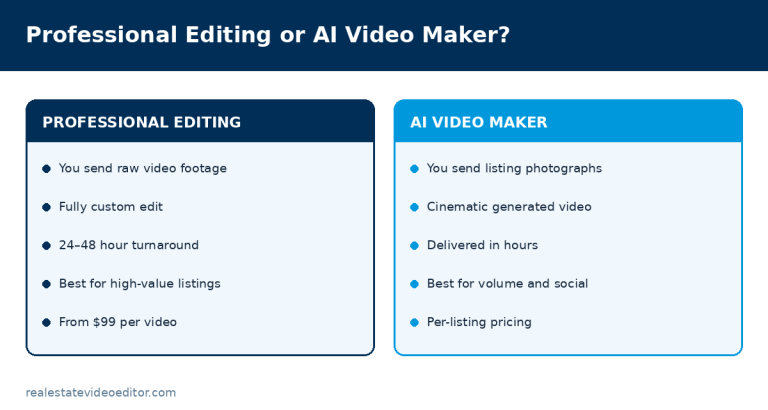
| Turnaround | Minutes to hours | 24–48 hours |
| Cost per listing | $30–$50 | $99–$299 |
| Creative control | Template-bound | Complete |
| Best for | Volume and social | Listings where video is the marketing |
Most people who use both settle on a rule of thumb: if the listing is above the median price in their market, it gets a human edit. Everything else gets generated. See our editing service for the human side.
Frequently asked questions
What is the best AI real estate video generator?
It depends on volume. For predictable monthly output, per-listing pricing from Reel-E or ourselves works out cheaper. For occasional one-off use, per-image pricing from Amplifiles is lower cost. Check unbranded cut support before committing either way.
Can AI really make a property video from photos?
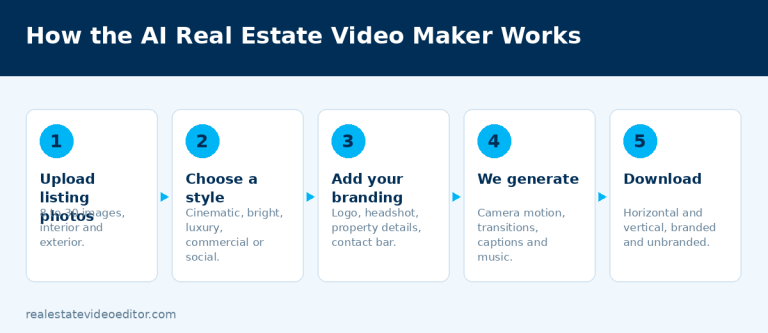
Yes. The tools estimate depth in each photograph, generate a camera path with parallax movement, and sequence the images with transitions, captions and music. You need 8 to 30 photographs and no video footage.
Are AI property videos allowed on the MLS?
Generally yes, provided the video does not misrepresent the property and carries no agent branding where the MLS prohibits it. Rules are set by your local MLS — standards are maintained through RESO but the specific rule is local.
Do AI video generators alter how the property looks?
They should not, and ours does not. Camera movement and depth are added to your existing photographs. Anything that generates furniture or alters finishes should be opt-in and disclosed — see our AI transparency policy.
How many photos do I need?
Between 8 and 30 across every product in this comparison. For a standard family home, 15 to 20 well-chosen photographs produce the best result.
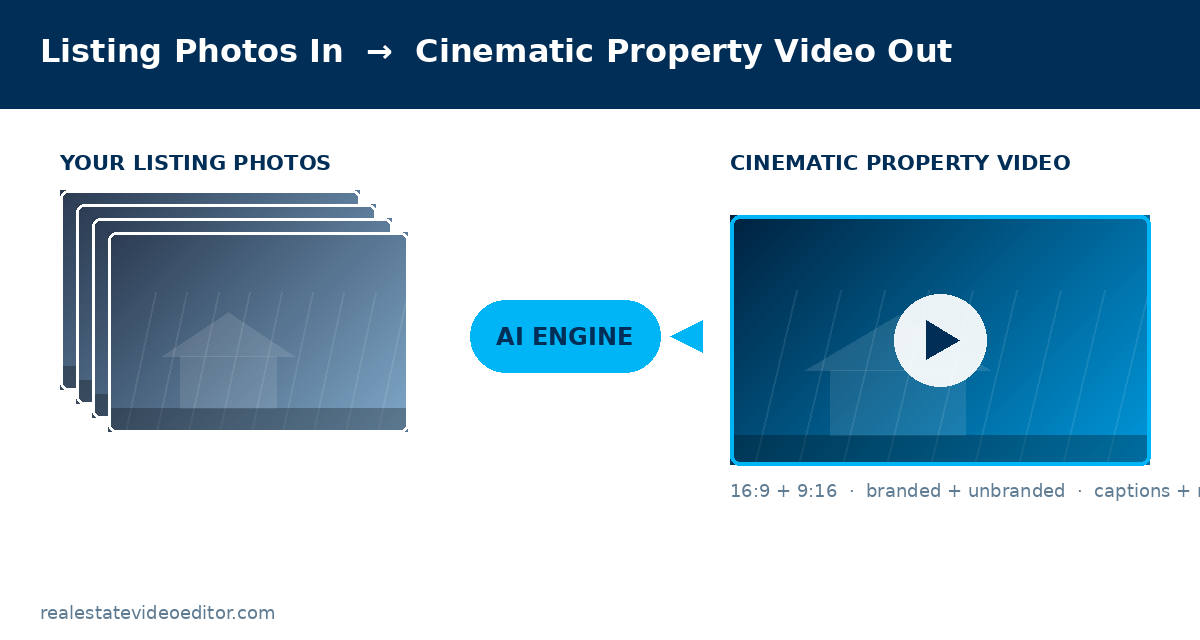
Want to try ours? Send 8 to 30 listing photographs and we return a cinematic property video in horizontal and vertical, branded and unbranded, from $49. See the AI video maker.
Sources and further reading
We link out to primary sources rather than to other blogs. Where a figure on this page comes from research we did not conduct, the original study is linked below.
- Google Search Central — Creating helpful, reliable, people-first content — Google’s guidance on content quality, which shapes how we write every page on this site.
- RESO — Real Estate Standards Organization — The body that maintains MLS data standards, including media and syndication rules.
- Instagram Help Centre — Reels specifications — Official Instagram documentation on Reels length, aspect ratio and upload requirements.
- YouTube Help — Create a YouTube Short — YouTube’s requirements for Shorts, including aspect ratio and duration.
- FTC — Endorsement Guides — US rules on testimonials and endorsements in advertising.
Related guides
AI Real Estate Video Makers: Complete Guide
How the technology works and what it can and cannot do.
Written by the editing team at Real Estate Video Editor. We edit property video every day for agents, photographers and brokerages. Figures on this page carry a source and a date. If something here is out of date or wrong, email [email protected] and we will correct it.

Specialist real estate video editors. We turn property footage and listing photographs into finished listing videos for agents, photographers and brokerages worldwide.
[email protected]
Replies within 4 business hours
Editing Services
AI Video Maker
Guides & Resources
Serving real estate agents, property photographers and brokerages in the United States, Canada, the United Kingdom, Australia and worldwide. All editing performed by a dedicated real estate video team. We do not shoot on location — everything is remote and digital.
- © 2026 Real Estate Video Editor
- Privacy Policy
- Terms of Service
- Acceptable Use
- Refund Policy
- AI Transparency